Moving a website off a hosted platform like Wix is one of those projects that feels straightforward until you are actually inside it. The building part, picking a new platform, choosing a layout, writing the copy, is rarely where people lose ground. The real risk lives in the things that were working quietly behind the scenes and that you never had to think about before.
The short answer to what matters most in a Wix website migration: protecting your existing URLs, getting your content out cleanly before you build anything, and keeping your email records untouched while you switch the domain. Get those three things right, and the rest of the project is manageable. Get any of them wrong, and the consequences can take weeks to show up, which makes them harder to trace back to the migration.
What follows is a practical walkthrough of each phase, in the order it actually matters, based on a real migration from start to post-launch.
Start With an Inventory, Not a Design
Before touching anything on the new platform, write down everything you are responsible for keeping alive. For most small business sites, that list is shorter than expected, but every item on it has the potential to hurt you if overlooked.
Your published URLs come first. Every blog post, every service page, every landing page that someone has linked to or that Google has indexed needs to be documented before you touch anything. Pull your sitemap from Wix and export your page list from Google Search Console, because those two sources together will surface pages you had completely forgotten existed.
Email configuration is the second item on that list, and it tends to cause the most damage when ignored. You need to know where your mail is hosted and which DNS records make it work. If you are running on Microsoft 365 or Google Workspace, those records live in exactly the same place as the records that point your domain at your website, and they need to stay untouched throughout the migration.
The third category is everything your platform was doing automatically without telling you: generating your sitemap, managing redirects, producing structured data. This category is invisible by design, which is exactly why people get caught off guard by it. When you leave a hosted platform, all of that becomes your responsibility.
Get Your Content Out Before You Build Anything
The content migration should happen before the build begins, because it will tell you how large the project actually is. This is a step that catches a lot of people off guard.
Wix is a closed, hosted platform, which means everything lives on their servers and you cannot export your full site as a complete file. Design elements, apps, and dynamic content are all proprietary. What you can export is limited, and the tools available usually give you something less complete than what you see on the page.
If your site has a blog, those posts may contain platform-specific formatting wrapped around the content, and images will be hosted on Wix's own servers rather than yours. That second point matters more than people realise: platform-hosted images stop working the moment you cancel the subscription, and that failure can show up weeks later when nobody is watching.
Two things are worth being deliberate about here. First, download every image and host it yourself on the new platform. Second, carry over the post metadata, particularly the original publish dates and meta descriptions, because that information feeds search results and your own content organisation later. Budget more time for this phase than you think you need.
How to Protect SEO During a Website Migration: The URL Decision
This is the step that separates a migration that holds its search rankings from one that quietly resets. It needs to be settled before you write a single line of code on the new site, because it shapes every structural decision that follows.
The rule is simple: every URL that has any search history attached to it should either resolve to the exact same address on the new site, or redirect permanently to the closest equivalent. Those are the only two acceptable outcomes. Anything that returns a 404 error is inbound traffic and link equity you have discarded.
The temptation to tidy up your URL structure during a migration is real and worth resisting. The small aesthetic improvement is not worth spending years of accumulated search equity that has built up around your existing addresses. If you genuinely need to reorganise, map every old address to a specific new destination before a single page goes live.
For pages that no longer exist on the new site, decide exactly where each one should send people. An old pricing page can point to your services page. A retired event page can point to wherever that content now lives. The specific destination matters less than making sure nothing lands on a dead end with no path forward.
Rebuild the Invisible Infrastructure Your Platform Was Handling
Hosted platforms handle several technical tasks automatically that you will now need to own yourself. None of it is particularly complex, but it is easy to forget because you never had to think about it before.
- XML sitemap: Tells search engines what pages exist on your site and when they were last updated.
- Robots.txt file: Tells crawlers which parts of the site they are allowed to access and where the sitemap lives.
- Structured data: The machine-readable summary of your business that feeds the information appearing beside your listing in search results.
- 301 redirect rules: The permanent redirects that handle every URL from the previous section.
Wix produced all of that silently in the background. When you leave, it leaves with you, and the consequences tend to arrive slowly enough that you might not immediately connect them to the migration.
Stage the Entire Site Before You Touch DNS
Build and publish the new site at a temporary address first, and get it completely finished there before your domain is involved at all. Read every page. Click every link. Check the mobile experience carefully. The domain switch should be the last thing you do, and it should feel boring by the time you get to it, because there should be nothing left to discover at that stage.
This approach also protects you during the transition period. Your Wix site can remain live and functional while the new build is being completed and reviewed, which means there is no pressure to rush.
How to Switch Your Domain Without Taking Down Your Email
This is the step that carries the most operational risk, and it is worth understanding clearly before you touch anything.
Your website and your email are controlled by different types of DNS records that happen to live in the same place. Your website typically requires one or two records to point your domain at the new hosting server. Your email runs on a separate set entirely, covering mail routing, sender verification, and various service-specific entries. Changing the website records has no effect on mail. But changing or deleting the wrong records takes your email down while the website continues to look perfectly healthy, which is the worst kind of failure because nobody notices immediately.
Two rules make this safe. Write down the current values of everything before you touch it, because that note is your rollback plan and it takes about thirty seconds to create. Then change only the records that point at your website, and leave every other record exactly as it is.
One additional trap worth naming: some hosting providers offer to take over your DNS management entirely when you move your domain, which sounds like a convenience but means rebuilding every email record from scratch. A safer approach is to point only the relevant website records at the new host and leave the DNS management where it is. That way, your mail configuration is never touched at all.
What to Check in the First 48 Hours After Launch
Confirm your email still works by sending and receiving a message before you do anything else, and certainly before you announce the new site anywhere.
Then walk your most important URLs. Take your top 20 blog posts and service pages and verify that every one resolves correctly on the new site. Submit your updated sitemap to Google Search Console so the new structure gets discovered quickly rather than slowly through organic crawling.
Keep your existing analytics property rather than starting a fresh one. That continuity means your before and after data sits on a single timeline rather than arriving as two disconnected data sets that are harder to compare.
Expect Search Console to show a period of adjustment after launch. Pages may sit in a "discovered but not yet indexed" state for days or even weeks while Google works through the new structure. That is normal rather than a sign that something went wrong, and it is worth understanding that before you see it so you do not make unnecessary changes in response.
What the Numbers Looked Like After
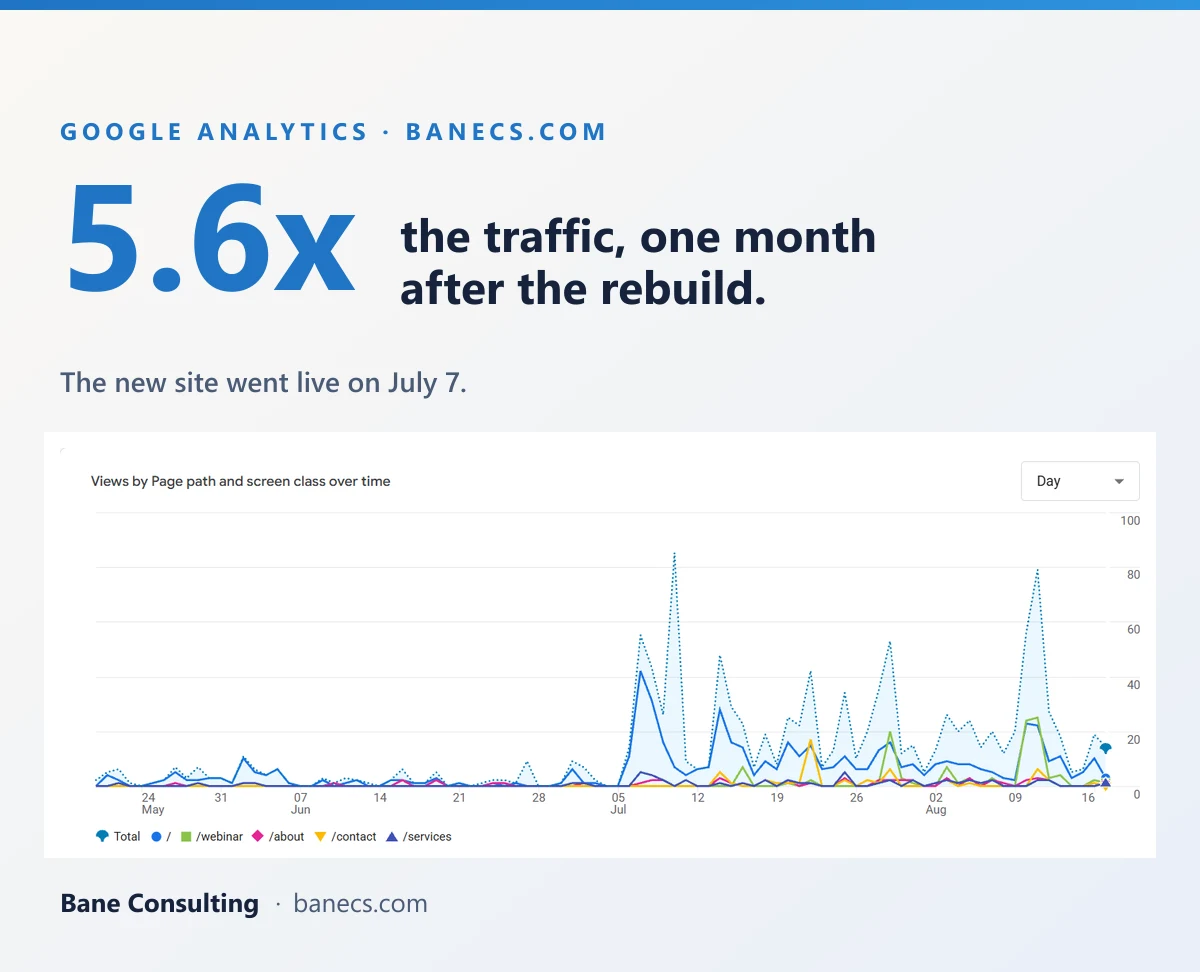
The last full month on the old site came in at 72 users. The first month on the new one came in at 405. That kind of growth does not happen by accident, but it also does not require a six-month agency engagement or a significant budget. It requires doing the unglamorous parts correctly: the inventory, the content export, the redirect map, the DNS records, and the post-launch checks.
The building itself was faster than expected. The thinking was considerably slower, and that is where the real work sits. Deciding what the site should say, who it is genuinely for, and what a visitor should do when they arrive took far longer than producing the pages. That work does not get easier with better tools because it is judgment rather than execution, and no platform change gets you out of having to do it.
A project like this used to mean an agency, a significant quote, and a timeline measured in months. That equation has shifted more than most small businesses have noticed yet, and the window to move ahead of the curve is still open.